 |
||
| ||
| |||||
 | |
|---|---|
| Auteur | Sujet : [TU] rFactor 2 =Release Public Online Ranked Race != |
 siro'd'13 Transactions (0) | Posté le 11-04-2022 à 13:42:57   Reprise du message précédent : |
Publicité | Posté le 11-04-2022 à 13:42:57 |
alieN. I'm a stuntmanTransactions (0) | Posté le 11-04-2022 à 16:54:53 Tu fais des trucs IRL Gimli ? Un peu de kart ? Parce que vu l’investissement et la rigueur doit y avoir un pti niveau de pilotage quand meme --------------- Je l'ai ! Ha bah non -_-' #RL |
Gimli Oakenshield Pro lurker since 2007 ™Transactions (0) | Posté le 11-04-2022 à 17:55:47
J'ai essayé 3 ou 4 fois du kart loisir, dont une fois avec des collègues où effectivement j'étais au dessus du lot, et une autre fois avec mon meilleur ami qui ne fait ni simu ni rien se rapprochant du pilotage et il roulait un peu mieux que moi (Mais je suis significativement plus grand et lourd que lui). Message cité 1 fois Message édité par Gimli Oakenshield le 11-04-2022 à 18:03:42 --------------- Pour suivre l'équipe : BlueSky OnOff Racing <=== : Mon équipe Le Mans Ultimate engagée en VEC | ===> Replays sur Youtube |
alieN. I'm a stuntmanTransactions (0) | Posté le 11-04-2022 à 18:00:36 Ok --------------- Je l'ai ! Ha bah non -_-' #RL |
sat 08 Team Haque-BarreTransactions (1) | Posté le 11-04-2022 à 21:22:18
--------------- Pur produit AHB |
Gimli Oakenshield Pro lurker since 2007 ™Transactions (0) | Posté le 11-04-2022 à 21:46:47
Message édité par Gimli Oakenshield le 11-04-2022 à 21:46:57 --------------- Pour suivre l'équipe : BlueSky OnOff Racing <=== : Mon équipe Le Mans Ultimate engagée en VEC | ===> Replays sur Youtube |
 mkfao Transactions (0) | Posté le 11-04-2022 à 22:20:20
Meuh non, pas du tout ! --------------- Il dit qu´il voit pas le rapport |
_desert eagle_ Transactions (4) | Posté le 12-04-2022 à 09:10:39
+1 --------------- Ventes de matos Simracing |
sat 08 Team Haque-BarreTransactions (1) | Posté le 12-04-2022 à 09:23:26 Ah ouais ok. --------------- Pur produit AHB |
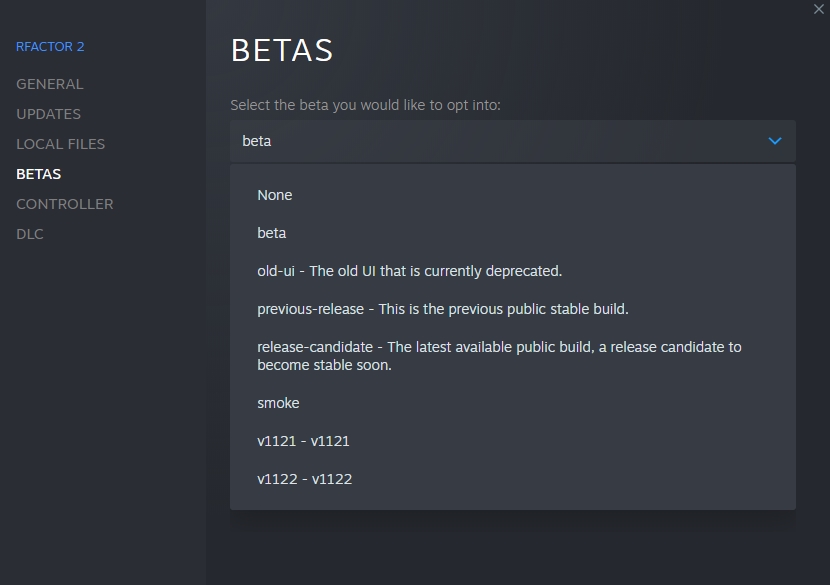
siro'd'13 Transactions (0) | Posté le 13-04-2022 à 19:17:59 La version candidate d'avril est maintenant disponible
Message édité par siro'd'13 le 13-04-2022 à 19:18:24 |
Publicité | Posté le 13-04-2022 à 19:17:59 |
Prudential Transactions (0) | Posté le 14-04-2022 à 03:06:00 DRap! |
Gimli Oakenshield Pro lurker since 2007 ™Transactions (0) | Posté le 14-04-2022 à 09:44:51 Je n'ai pas testé la RC personnellement, mais j'ai des échos comme quoi le nouveau moteur sonore envoie du pâté, je crois que la semaine prochaine après les 24H de Daytona je vais tester ça par curiosité --------------- Pour suivre l'équipe : BlueSky OnOff Racing <=== : Mon équipe Le Mans Ultimate engagée en VEC | ===> Replays sur Youtube |
siro'd'13 Transactions (0) | Posté le 14-04-2022 à 11:20:59 J'ai pas test toutes les caisses mais effectivement ya clairement du mieux, la fonction HRTF fait bien le taf avec un casque c'est excellent, par contre il faut bien régler les détails son moteur, son pneu, ect... Il va falloir retravaillé pas mal de sons je pense ou du moins revoir les équilibres des fréquences, mais le potentiel est la clairement ça fait plaisir!
|
sat 08 Team Haque-BarreTransactions (1) | Posté le 14-04-2022 à 11:32:18
--------------- Pur produit AHB |
alieN. I'm a stuntmanTransactions (0) | Posté le 14-04-2022 à 11:49:30 Cool moi j'avais demandé la racing line Message cité 1 fois Message édité par alieN. le 14-04-2022 à 11:51:47 --------------- Je l'ai ! Ha bah non -_-' #RL |
siro'd'13 Transactions (0) | Posté le 14-04-2022 à 13:18:05 |
_desert eagle_ Transactions (4) | Posté le 14-04-2022 à 18:32:35 Cette release candidate du turfu J ai hate de tester le son, notamment de la nissan GT500
Mouais --------------- Ventes de matos Simracing |
siro'd'13 Transactions (0) | Posté le 14-04-2022 à 19:17:48 toi aussi...vraiment aucune reconnaissance...
|
_desert eagle_ Transactions (4) | Posté le 15-04-2022 à 00:23:51 On taquine, et puis en plus des commentaires sur leur forum, les mecs ont du bien voir (ou plutot entendre) que la concurrence faisait mieux, notamment les gt3 de acc ; même iracing a taffé sur les sons il y a quelques temps, il ne manquait plus que rf2 --------------- Ventes de matos Simracing |
siro'd'13 Transactions (0) | Posté le 15-04-2022 à 10:11:50 Bien-sûr et je suis loin d'être le seul a avoir fait la remarque, mais a chaque release je le faisais remarquer systématiquement |
Nitro-teck Fly with meTransactions (0) | Posté le 15-04-2022 à 10:44:24 Notre grand ami Antotitus au moins à l'air satisfait, et effectivement le son à l'air enfin bien mieux.
|
sat 08 Team Haque-BarreTransactions (1) | Posté le 15-04-2022 à 10:48:57 Même pas je clique... --------------- Pur produit AHB |
siro'd'13 Transactions (0) | Posté le 15-04-2022 à 16:31:40 idem, même pas foutu de test le mode de compétition online, il préfère dire que y'a carrément pas de online et de passer son chemin... tres objectif... |
dced Transactions (0) | Posté le 19-04-2022 à 13:54:13
|
Nitro-teck Fly with meTransactions (0) | Posté le 19-04-2022 à 14:09:46 C'est pour ça que je le post ici, je sais qu'il est pas objectif, et pour une fois trouvais la maj de rF2 très bonne.
|
mkfao Transactions (0) | Posté le 19-04-2022 à 15:25:52 Moi je suis fan de Mauvaisefoitifus --------------- Il dit qu´il voit pas le rapport |
alieN. I'm a stuntmanTransactions (0) | Posté le 19-04-2022 à 15:32:52
--------------- Je l'ai ! Ha bah non -_-' #RL |
siro'd'13 Transactions (0) | Posté le 19-04-2022 à 15:54:11 Ya 6 champ dont 4 avec des courses toutes les heures déjà pas mal mais dire que y'a pas de online... |
Nitro-teck Fly with meTransactions (0) | Posté le 19-04-2022 à 15:58:08 Pour le coup il compare un service qui tourne depuis 10ans à rF2 qui met seulement ça en place depuis quelques mois (bientot 1ans ?) |
alieN. I'm a stuntmanTransactions (0) | Posté le 19-04-2022 à 15:59:31 Avec une grille remplie, par 4 pelos à 18h --------------- Je l'ai ! Ha bah non -_-' #RL |
alieN. I'm a stuntmanTransactions (0) | Posté le 19-04-2022 à 16:00:21
--------------- Je l'ai ! Ha bah non -_-' #RL |
siro'd'13 Transactions (0) | Posté le 19-04-2022 à 17:18:21
|
kenrio Transactions (0) | Posté le 19-04-2022 à 18:10:32
--------------- https://robertsspaceindustries.com/orgs/HFR - referral STAR-K42Q-BZFS - origin : kenrio77 |
siro'd'13 Transactions (0) | Posté le 19-04-2022 à 18:23:47 classement par point sur les champ |
Roger01 Transactions (1) | Posté le 24-04-2022 à 00:36:56 Hello,
|
siro'd'13 Transactions (0) | Posté le 24-04-2022 à 10:44:03 salut,
|
Gimli Oakenshield Pro lurker since 2007 ™Transactions (0) | Posté le 24-04-2022 à 16:42:47 +1 y'a plein de ligues en France qui organisent des courses, et si tu commences à avoir du niveau y'a des ligues internationales qui pourront répondre à tes envies de compétition. Message édité par Gimli Oakenshield le 24-04-2022 à 16:43:16 --------------- Pour suivre l'équipe : BlueSky OnOff Racing <=== : Mon équipe Le Mans Ultimate engagée en VEC | ===> Replays sur Youtube |
juan1972 Transactions (2) | Posté le 25-04-2022 à 19:10:40 Le mode compétition effectivement n'attire pas grand monde, au pire va faire un tour chez les Arsouilles GP, y a du monde qui tourne tout le temps.
--------------- Achats/V€nt€s / G€€k Room by Juan |
bendx Transactions (0) | Posté le 25-04-2022 à 21:26:39 Juan. |
siro'd'13 Transactions (0) | Posté le 25-04-2022 à 23:09:02 Announcing Donington Park Grand Prix Circuit
|
alffir Transactions (5) | Posté le 25-04-2022 à 23:14:08
--------------- Il vaut mieux mobiliser son intelligence sur des conneries que mobiliser sa connerie sur des choses intelligentes. |
Publicité | Posté le |


![[:zzozo]](https://forum-images.hardware.fr/images/perso/zzozo.gif "[:zzozo]")


![[:shimay:1]](https://forum-images.hardware.fr/images/perso/1/shimay.gif "[:shimay:1]")
![[:nicopf:2]](https://forum-images.hardware.fr/images/perso/2/nicopf.gif "[:nicopf:2]")
![[:leamas:5]](https://forum-images.hardware.fr/images/perso/5/leamas.gif "[:leamas:5]")
![[:clooney3]](https://forum-images.hardware.fr/images/perso/clooney3.gif "[:clooney3]")


![[:getalife]](https://forum-images.hardware.fr/images/perso/getalife.gif "[:getalife]")
![[:moonzoid:5]](https://forum-images.hardware.fr/images/perso/5/moonzoid.gif "[:moonzoid:5]")
![[:donkeyshoot]](https://forum-images.hardware.fr/images/perso/donkeyshoot.gif "[:donkeyshoot]")
![[:leamas]](https://forum-images.hardware.fr/images/perso/leamas.gif "[:leamas]")

![[:budykiller]](https://forum-images.hardware.fr/images/perso/budykiller.gif "[:budykiller]")

![[:satrincha:1]](https://forum-images.hardware.fr/images/perso/1/satrincha.gif "[:satrincha:1]")
![[:vave1:4]](https://forum-images.hardware.fr/images/perso/4/vave1.gif "[:vave1:4]")
![[:heow]](https://forum-images.hardware.fr/images/perso/heow.gif "[:heow]")

